
For most people a memory module is its capacity and its generation: 32GB, DDR4 or DDR5. That is enough to order a matching module from a vendor, and most people never read further.
The sticker holds the module’s full configuration, written twice. Once as a spec code in a standard format, 32GB 2Rx4 PC4-2933Y-RB2-12, and once as the manufacturer’s part number, M393A4K40DB3-CWE. Together they give capacity, ranks, chip width, speed, latency, module type and the size of the memory chips inside.
How much of it needs to be understood depends on the task. Identifying and pricing used modules takes four fields of the spec code: generation, capacity, module type and speed. Adding memory to a server takes two more, ranks and chip width, checked against that server’s memory population guidelines. Matching a module exactly means decoding the manufacturer’s part number.
| The task | What to read | Read as far as |
|---|---|---|
| Identify or price used modules | generation, capacity, module type, speed | The four basic fields |
| Add memory to a server that already has some | those four, plus ranks and chip width, checked against the server’s population guidelines | Ranks and chip width, then the mixing rules |
| Match a module exactly, or verify what it really is | the manufacturer’s part number, and its datasheet for chip size | The manufacturer’s part number |
The four basic fields: generation, capacity, module type and speed
The spec code follows a format set by JEDEC, the industry standards body, whose DDR4 DIMM product label standard defines what goes on the sticker, so it reads the same way on every brand. Taking the same example, 32GB 2Rx4 PC4-2933Y-RB2-12, HPE’s guide to DIMM labels breaks it into pieces.
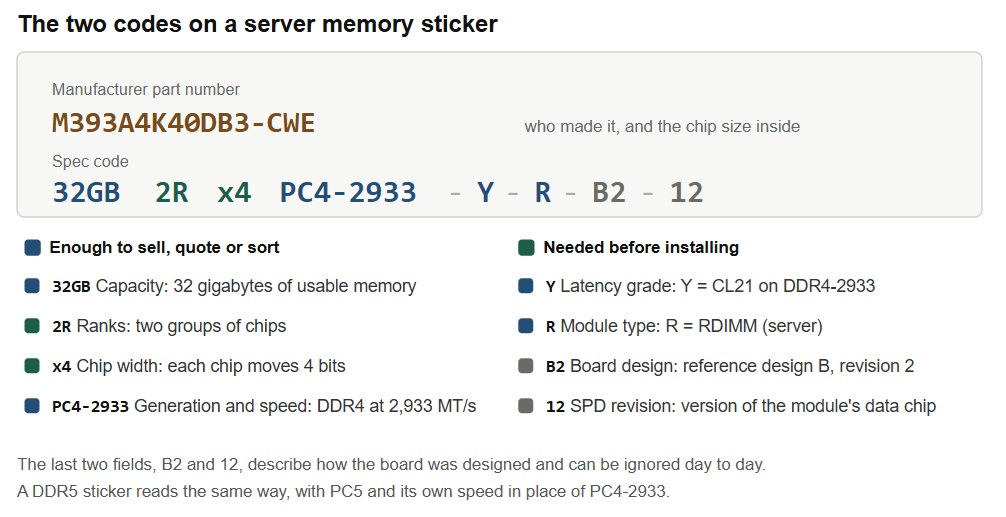
Four of those fields answer most questions. PC4 is the generation, DDR4, where PC5 means DDR5, and the two don’t fit the same sockets. 32GB is the capacity. The R is the module type: an RDIMM, the standard server module, where L marks an LRDIMM, which adds buffer chips so a server can hold more memory. And 2933 is the speed in megatransfers per second, which some listings write as bandwidth instead (PC4-23400).
The module type is the field people skip, and it matters as much as the capacity. A server built for RDIMMs won’t run a desktop module, and registered memory won’t work in a board that wasn’t designed for it either. Small single-socket servers are the exception: Dell’s PowerEdge R250 takes unbuffered ECC modules, which are desktop-style modules with error correction. Desktop and laptop memory uses the same style of label, so the reading here works there too: SK hynix lists U for a desktop UDIMM, S for a laptop SODIMM and E for a desktop module with error correction. Only the prefixes change. In Samsung’s scheme, M393 is a server RDIMM, M378 a desktop module and M471 a laptop module.
The letter after the speed, Y here, is the latency grade: Y stands for CAS latency 21, the number of clock cycles the memory takes to answer, and lower is quicker at the same speed. DDR5 numbers look much worse beside it, because Micron’s 32GB DDR5-4800 datasheet lists CL40. But DDR5’s clock cycles are shorter, so the gap is far smaller than 40 against 22 suggests. Working from the published timings, CL40 at 4800 MT/s comes to about 16.7 nanoseconds against 13.75 for DDR4-3200 at CL22.
Ranks and chip width: what 2Rx4 describes
The two fields left over, ranks and chip width, describe how the module is built. They are the two fields a server’s population guidelines refer to.
A memory module is a circuit board with memory chips on it. On DDR4, a server reads 72 bits at once: 64 bits of data plus 8 bits it uses to catch and correct errors. No single chip supplies all 72, so chips work in parallel. Kingston’s glossary puts it in terms of width: an x4 chip moves 4 bits at a time and an x8 chip moves 8. One full set of chips, enough to fill those 72 bits, is a rank. So a DDR4 x4 rank takes 18 chips and an x8 rank takes nine. The number of sides doesn’t tell you the rank count, because an x4 module can carry a single rank spread across both faces. That is why the label states it.
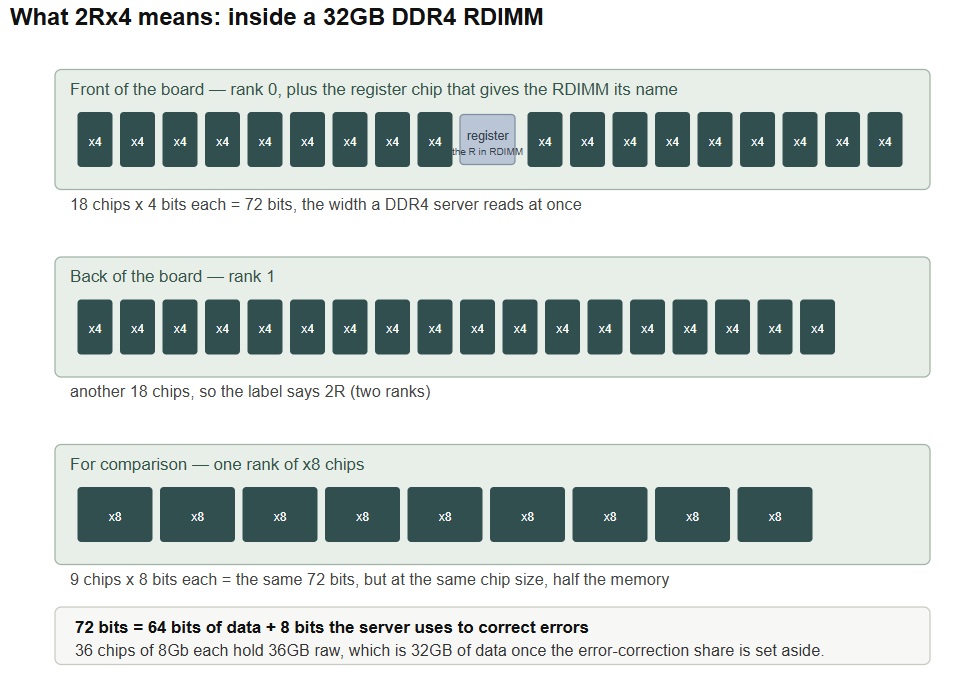
That also explains how chip size turns into module capacity: 36 chips of 8Gb, meaning 8 gigabits each, come to 36GB of raw DRAM, which is 32GB of data once the error-correction share is set aside.
A DDR5 module presents two narrower subchannels instead of DDR4’s single wider path, which is where Lenovo’s 9×4 and 10×4 labels come from: nine x4 chips per half make 72 bits in total, ten per half make 80. Those extra bits are what let a 10×4 module survive a whole chip failing, though Lenovo notes that every DDR5 module corrects the most common failures either way.
The mixing rules: what DDR4 allowed and DDR5 does not
On DDR4, RDIMMs and LRDIMMs cannot be mixed. On the DDR5 servers below, the rule in the manuals separates standard RDIMMs from 3DS RDIMMs, which stack several chips in each package. On both, mixed speeds run at the pace of the slowest module.
DDR5 adds rules beyond that. Dell’s DDR4 PowerEdge R740 manual says “x4 and x8 DRAM based memory modules can be mixed,” but the DDR5 R760 manual lists “X4 and X8 DRAM memory modules” and different capacities among the mixes it doesn’t support. Lenovo’s DDR5 SR850 V3 goes further: “Mixing of DRAM technology (16Gb, 24Gb, 32Gb) is not supported.” That rule is about the size of the individual chips, and the spec code never shows it. Dell’s manuals spell out the risk of ignoring any of this: the system “might not boot, stop responding during memory configuration, or operate with reduced memory.” That is why the label alone doesn’t decide an upgrade. It supplies the fields, and the server’s own population guidelines decide which modules can be installed together. Those guidelines differ by model.
| Label field | DDR4 (Dell R740) | DDR5 (Dell R760, Lenovo SR850 V3) |
|---|---|---|
| Module type | RDIMM and LRDIMM can’t mix | Standard and 3DS RDIMM can’t mix |
| Capacity | Two different capacities allowed | Not supported on Dell R760 |
| x4 vs x8 chips | Can mix | Not supported |
| Chip size (16Gb vs 24Gb) | No rule listed | Not supported on Lenovo |
The manufacturer’s part number: Samsung, SK hynix and Micron
Chip size is the one thing the spec code never shows, and each manufacturer encodes it differently.
Samsung part numbers start with M, and in M393A4K40DB3-CWE the A means DDR4, the 0 means x4 chips (a 3 would mean x8) and the K means 8Gb chips. The code after the dash is the speed: WE is DDR4-3200 at CL22, VF is 2933 and TD is 2666. That makes it a 32GB 2Rx4 DDR4-3200 RDIMM. DDR5 RDIMMs start with M321R, and Samsung’s DDR5 datasheet makes M321R8GA0BB0-CQK a 64GB module of 16Gb chips at 4800 MT/s.
SK hynix starts with HM, then A for DDR4 or C for DDR5. Its DDR4 datasheet makes HMA84GR7CJR4N a 32GB 2Rx4 module on 8Gb chips, with VK for DDR4-2666, WM for 2933 and XN for 3200. On DDR5 the capacity comes first and chip size is a single letter: in HMCG88MEBRA115N, G8 is 32GB, EB is 4800 MT/s, R is RDIMM and the A marks 16Gb chips, where a B would mean 24Gb.
Micron starts with MT. Its numbering guide reads MTA36ASF4G72PZ-2G9E1 as a 32GB DDR4-2933 RDIMM, built from 36 chips, and the 72 in the middle is the 72-bit width from the diagram above. DDR5 parts start with MTC, where MTC20F2085S1RC48BA1 is a 32GB DDR5-4800 module and the 96GB datasheet gives 56B for 5600 and 64B for 6400. Micron’s code encodes die count, organization and speed, but not chip density as a field of its own, so the datasheet is the safer place to confirm it: the 64GB MTC40F2046S1RC48BA1 uses 16Gb chips.
When the sticker says HPE, Dell or Lenovo
Server vendors buy their memory from these same manufacturers and add their own label. HPE’s spec sheet lists a 32GB dual-rank x4 DDR4-2933 module as P00924-X21, with -H21 and -K21 versions for other product lines, and resellers often list it as P00924-B21 with spare and assembly numbers alongside. Any one of those numbers usually leads to the others and to the module underneath: one reseller ties this one to SK hynix HMA84GR7CJR4N-WM. Lenovo’s parts lists are easier, because they spell the specs out in words: part 4X77A77030 is a 32GB TruDDR5 4800MHz 1Rx4 RDIMM built on 16Gb chips.
When the manufacturer’s number isn’t on the sticker, the server can read it from the module’s SPD chip, the small data chip that tells the server what the module is. HPE staff note that iLO 5, HPE’s built-in management controller, shows the DIMM manufacturer, and Get-CimInstance Win32_PhysicalMemory | Select-Object Manufacturer, PartNumber in Windows PowerShell or lshw -class memory on Linux does the same (our guide to checking memory specifications covers the desktop tools). That gives a second identifier to compare against the sticker, worth checking since loose SK hynix labels were reported circulating on auction sites in May 2026 alongside fake laptop modules wearing them. A mismatch between the sticker and what the module reports is a red flag, though matching SPD data proves only that the two agree. The SPD sits in a small EEPROM that can be written and then locked, so it can be programmed to match a false label.
Four fields from the spec code identify and price a used module. Two more, read against the server’s population guidelines, decide whether it can be installed alongside the memory already there. The part number settles chip size, and on DDR5 that is the field most likely to stop a module working where its capacity and speed say it should. Either way, a sharp photo of the whole sticker, both lines, is the first thing to take when selling RAM.