
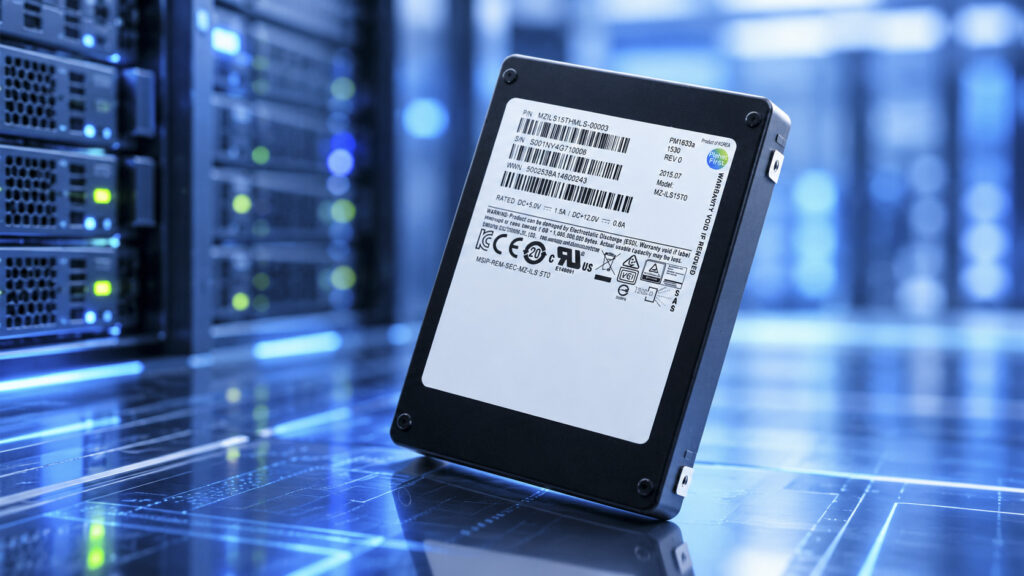
Samsung Enterprise SSD.
TL;DR: This guide is for anyone selling SSDs pulled from servers and storage arrays. If market researcher TrendForce’s estimates hold, the contract prices big buyers pay for new enterprise SSDs will end 2026 at roughly four times their end-2025 level. Used prices rose much less and unevenly. The guide starts with used price ranges for common models, then covers how buyers identify a drive and read its health, why array drives that show 0 GB may only need reformatting, and how to wipe and list drives.
A decommission usually leaves a box of pulled drives: a few dozen 3.84TB NVMe drives from a database cluster, some SAS SSDs from a storage array that show 0 GB on a test machine, and a handful of old 480GB SATA boot drives. Ask three buyers to quote on that box and the offers can be far apart, while headlines about soaring SSD prices make it harder to tell what a used enterprise SSD is worth.
New enterprise SSD prices did soar in 2026, as AI data centers bought up NAND flash, the memory chips inside every SSD. Used prices rose far less: a used 3.84TB Samsung PM9A3 sold for $440 to $620, up about 60% in a year. As the refurbished-parts seller PC Server & Parts puts it, used drive prices “are set by the supply of decommissioned hardware” rather than by this quarter’s chip contracts.
How much new and used enterprise SSD prices rose
The used drives tracked by AMCompute, which appraises used hardware for lenders and lessors, mostly rose by far less than new ones. Its figures cover used drives sold in the 12 months through August 2026:
| Drive | Used price, 12 months to Aug 2026 | Change over the year |
|---|---|---|
| Samsung PM9A3 1.92TB (NVMe) | $350–400 | Up about 155% |
| Samsung PM9A3 3.84TB (NVMe) | $440–620 | Up about 60% |
| Samsung PM9A3 7.68TB (NVMe) | $800–1,100 | Up about 50% |
| Micron 7450 PRO 3.84TB (NVMe) | $690–860 | Up about 95% |
| Kioxia CM6-R 3.84TB (NVMe) | $450–600 | Up about 180% |
| Kioxia CD6-R 7.68TB (NVMe) | $540–670 | Up about 5% |
| Samsung PM1643a 3.84TB (SAS) | $380–440 | Up about 70% |
| Intel S3520 480GB (SATA) | $40–47 | Up about 70% |
New drives are a different story. Contract prices, what server makers and cloud companies pay drive makers under supply deals, rose approximately 80% in the first quarter of 2026 over the previous quarter, driven mostly by AI data centers. Its quarterly contract-price reports, dated April 24 and July 29, put the next two quarters at 48% to 53% and 20% to 25%, and it forecasts 23% to 28% for the fourth. Compounded, those figures put contract prices at more than two and a half times their end-2025 level by mid-year, and roughly four times by December if the estimates hold.
Six of the eight used rows rose less than 100%. The comparison is loose, because AMCompute measures resale prices for particular models through August while TrendForce measures contract prices for new drives through December. Size doesn’t predict the gain either. The 7.68TB drive rose least for the PM9A3 and the Micron 7450 PRO, but AMCompute’s Micron 9300 PRO 7.68TB rose about 125%, against about 15% for the 3.84TB, so buyers price model by model.
Because these ranges are past sales, they are context for judging an offer, not a price list. The real test is a current quote, compared with others after freight, testing terms and payment timing. New prices are no better as a yardstick. In an August check, PC Server & Parts found new NVMe U.2 drives listed at $300 to $1,172 per terabyte. On October 19 the IT reseller SHI listed the 3.84TB PM9A3 at $2,442, against a used range of $440 to $620.
On selling now or waiting, PC Server & Parts argues that used prices follow new ones with a lag and that “the lag has been running out through 2026,” but it gives no figures. Holding drives is a bet that it is right and that the memory shortage lasts.
Identify the drive first
Buyers price a drive by its exact model, so the label comes first. Drives from Dell, HPE or Lenovo servers carry the server maker’s part number as well as the drive maker’s model. Dell shows two Kioxia drives with the same maker model but different Dell part numbers, sizes and endurance. A listing needs the OEM part number and the capacity.
The capacity also hints at the endurance class, which is how many full rewrites a day the drive is rated for over its warranty, written as drive writes per day or DWPD. Read-intensive drives, built for data that is mostly read, often come in 960GB, 1.92TB, 3.84TB and 7.68TB at about 1 DWPD. Mixed-use drives, built for heavier writing, often come in 800GB, 1.6TB, 3.2TB and 6.4TB at about 3 DWPD, like Kioxia’s CM6-V. Older high-endurance drives break the pattern, so the spec sheet for the exact model settles it. On the two Dell drives above, the 800GB version is rated for about two and a half times the total writes of the 960GB one, so it is a different product, not a smaller one.
The health data buyers read
Buyers check the wear level first. NVMe drives report Percentage Used, the maker’s estimate of how much rated life is gone. SAS drives show a percentage used endurance indicator on a similar scale. On both, 100 means the rated endurance is spent, not that the drive has failed, and the value can go past 100. SATA drives report wear through SMART attributes, the health counters a drive keeps about itself, which vary by maker. A second check compares total data written with rated writes. PC Server & Parts gives the formula as DWPD × capacity × 365 × warranty years, which comes to about 7,000TB for a 3.84TB, 1 DWPD drive with a five-year warranty.
The one large public sample is reassuring, within limits. Of 1,347 used data-center SSDs ServeTheHome bought over eight years, in a study it disclosed as sponsored, “the majority of actual workloads ran under 1 DWPD”. That says how hard those drives were written, not how much life a given lot has left, which only its own logs show. None of the sources puts a price on a wear level, or on mixed-use against read-intensive.
Other readings can turn a drive into a return. DatacenterDisk’s checklist, for example, rejects a drive when its Available Spare, the reserve of replacement flash, is at or near its threshold. It does the same when an NVMe drive logs any media errors, the count of data-integrity errors the drive could not recover from. Other buyers set their own limits.
| What the buyer checks | Where it shows up | How it affects the offer |
|---|---|---|
| Model, capacity and interface | Maker model, or Dell, HPE or Lenovo part number on the label | Sets the price range; NVMe holds value better than SATA |
| Endurance class | Exact model or OEM part number; capacity is a clue (800GB, 1.6TB, 3.2TB, 6.4TB are often mixed-use) | Sets which model it is priced as |
| Wear used | NVMe Percentage Used, SAS endurance indicator, SATA SMART attributes | Checked first, alongside total data written |
| Spare and errors | NVMe Available Spare against its threshold, media errors | Low spare or any media errors can mean a return |
| Sector format | Shows 0 GB, or “Unsupported sector size 520” in Linux | Can’t be tested until it is reformatted |
Array drives that show 0 GB
Drives pulled from storage arrays need one more check before anyone writes them off. Arrays from NetApp, EMC and HPE 3PAR often format drives with 520-byte sectors, the usual 512 bytes of data plus 8 bytes the array uses to check it. A normal server expects 512, so the drive shows up as 0 GB and Linux logs “Unsupported sector size 520.” The drive looks dead, but it may simply be formatted for the array.
The fix is a low-level reformat to 512 bytes with the Linux tool sg_format, run through a plain SAS host bus adapter (HBA), a card that passes drives straight to the operating system. Dell PERC and HP Smart Array RAID controllers can’t work with 520-byte disks even in HBA mode, so it is worth checking the specific controller before relying on one. sg_format is a SAS tool: it sends SCSI format commands, erases everything on the drive, and works only if the drive’s firmware accepts a 512-byte format.
Some drives still fail after reformatting, when their firmware locks them to one array maker’s systems. With the right HBA, reformatting one drive as a test shows whether a batch is fixable. Without one, the drives can go on the list as they are, with the array model they came from, so the buyer can judge them before quoting rather than after. Either way, a drive that hasn’t been reformatted or sanitized still holds the array’s data, which has to be dealt with before it ships.
Self-encrypting drives add one more lock. A Dell PowerStore array gives each drive a unique PIN for that system. A drive moved elsewhere shows as foreign until it is reset with the PSID, a 32-character reset code printed on its label. Peeling the label off can leave a locked drive with no way back.
Preparing drives for sale
Buyers read every health log anyway, so a screenshot or smartctl log for each serial number, sent with the list, saves a round of repricing after testing. Consumer M.2 drives from desktops and laptops sell on a separate market. There, a CrystalDiskInfo screenshot of health, power-on hours and total writes does the same job.
A security team will want a method it can sign off. NIST’s media sanitization guideline, SP 800-88 Revision 2, finalized in September 2025, says overwriting SSDs that keep hidden spare flash “should be avoided as very little confidentiality protection is achieved.” It points instead to the IEEE 2883 standard, whose purge methods include the drive’s own sanitize commands, such as block erase and cryptographic erase. The method has to suit the drive: cryptographic erase only works if nothing sensitive was ever stored on it unencrypted. NIST also asks that results be checked, recommends a certificate for each drive, and says a drive that fails sanitization needs another method or, as a last resort, destruction. Reformatting a 520-byte drive is not a sanitize step.
Labels stay on, because they carry the OEM part number and the PSID. A good list gives model, OEM part number, capacity, interface, wear and quantity. It also says whether drives are in their trays, whether they go as one lot, and which server or array each batch came from.
Then send the same list to several buyers and compare the offers as whole transactions. A high quote is worth less when the seller pays freight, the buyer can reprice the lot after testing, or payment takes weeks to arrive, so before deciding where to sell used enterprise SSDs, ask each buyer about all three. For drives that show 0 GB, the most useful line on any list is the name of the array they came out of.